
Each Sunday at Church of the Epiphany we record our sermon using someone’s mobile phone. We started doing this back in September and, for the last three months, editing and uploading these sermons to our website has been a fairly manual process. Starting this month, however, with a combination of JustCast, Dropbox, Hazel, Squarespace, and Auphonic I’ve been able to mosty automate the process.
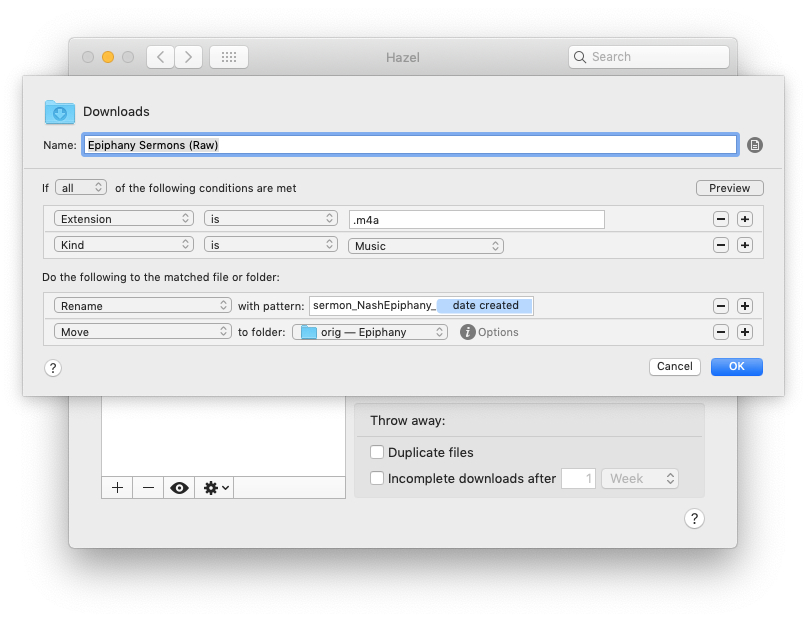
Each week shortly after worship, Fr. Justin e-mails me the audio recording of his sermon from his phone. His Android phone defaults to .m4a for audio, so I’ve setup a simple Hazel rule to monitor my download folder for that extension so the file is quickly renamed and moved off to my external archive drive.
Many of the essays on this site start their life in Microsoft Word or Scrivener. Early on, I would have to convert essays to Markdown for posting manually. This generally worked okay, but I lost my footnotes. I tried Word to Markdown for a brief while, but it didn’t work entirely as I’d like it to. Enter Pandoc. I’ve been using Pandoc to convert all of my Word documents — including footnotes — for the last two years. I’ve been delighted with the results.
Read more...Recently I came across the need to automatically update my status in Slack. I have class Monday and Tuesday afternoons/evenings which requires me to leave work a little early. As I’m often rushed, I don’t always remember to set my status. This has, at times, left my team waiting on a response to a message I won’t see for a few hours.
Luckily, using Slack’s legacy tokens and following the guidance of Made by Munsters I was able to use IFTTT to quickly automate the updating of my Slack status.
Read more...I’ve been using DayOne as my journal since 2014. Very early on, I realized that a good part of my daily journaling was actually done on Twitter. Over the years I’ve used IFTTT to import my tweets, but the fact that that system didn’t include images or quoted tweets removed a lot of important context. I wanted something nicer that showed the full Twitter card with graphics, etc. DayOne’s recent release of activity feeds seemed to be a good solution, but it, too, lost a lot of context and was very manual.
Read more...A common problem for my wife and daughter since I started working from home more and more was knowing when I was on a conference call. My office has a glass door and the hallway behind it leads upstairs and to the master bedroom, so my family — understandably — likes to know if they’ll be on camera or not when they walk past. It’s also handy for them to know when they can ask me a question verbally rather than having to send me a text message from the room next door.
Read more...I really enjoy automating things using Workflow, Hazel, shell scripts, or just about anything else.
Last night I got the idea that it would be cool to have a graphical archive of each post to my website as it appeared the day it was posted. Over time I’ll have a visual history of how my website has changed and, who knows, might make a little coffee table book or something.
The automation for this is fairly simple. I took an existing Workflow I had that used the JSONFeed of my site to grab the most recent post and modified it
Read more...



 ]
] ]
] ]
] ]
] ]
]